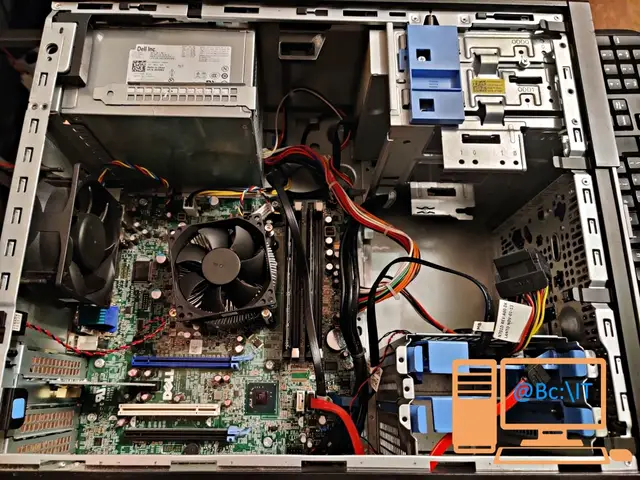
The Dell OptiPlex 790 computer we present today was configured by us in November 2020 to be used for online school during the pandemic. It was ordered from one of the partners we work with for refurbished PC systems, and consists of:
- Dell OptiPlex 790 Tower computer, Intel Core i5-2400 3.10GHz, 4GB DDR3, 250GB SATA, DVD-ROM
- Upgrade: Mouse + Keyboard, Wireless
- Computer DDR 3: Upgrade to 8Gb (Upgrade from: Upgrade to 4Gb)
- +PLUS Warranty: +1 year PLUS warranty
- Upgrade from HDD to SSD (HDD dropped): SSD 240GB (NEW) (Upgrade from: PC HDD 250GB) - TP-Link Wireless TL-WN881ND network card, PCI-E, 2 detachable antennas, 300Mbps, 2.4GHz, Low + High Profile bracket
- Genius HD 720p Facecam 1000x webcam, CMOS, 720p up to 30fps, Microphone, USB
- Dell 2007WFP LCD monitor, 20 inch, 1680 x 1050, VGA, DVI
As you can see from the details above, the base system was improved by increasing the RAM, extending the warranty period and replacing the HDD with an SSD. Although it is a desktop computer, adding a wireless network card makes it mobile and the network cable can be dropped, as the client asked. The webcam and the monitor are ideal for the computer's main purpose, online school.
All of this was possible at a very advantageous price for the pandemic period, when all similar configurations were overpriced.
The computer came back to us this week for maintenance and service. On a quick inspection we found that the motherboard battery was worn out, which is why the user was getting warnings when the system started. Here are the hardware services and software services we applied.
- replacing the battery (CR2032) on the motherboard, which is responsible for keeping the BIOS settings
- diagnosing the system using the Dell motherboard utility
- updating Microsoft Windows 10 from 22H1 to 22H2 and installing the related updates
- Microsoft Office reinstallation
- virus scan
- cleaning temporary and unnecessary files of the operating system, most of them left over after the update process
As usual, at the end of the article you will find a photo gallery with some of the services we applied.