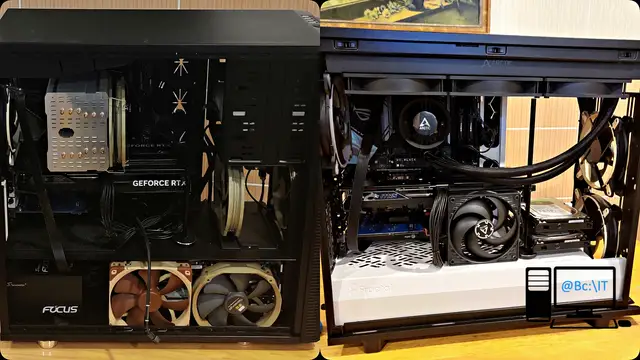
In this article we present the process of replacing a twelve-year-old gaming case with air cooling by a new case of modern design that allows a liquid cooling solution to be installed. That was the main reason for the switch to the new case: the owner had changed the graphics card in the configuration, and the case's ventilation system pushed the hot air generated by the graphics card toward the processor's heatsink, causing the processor to overheat.
The previous case is the Fractal Design Define XL Black Pearl model, a full tower case designed for good ventilation and for housing a large number of data storage devices. The case was equipped with seven fans meant to provide the airflow needed to properly cool the whole system, which in the past was equipped with eight hard disk drives.
The seven fans that cooled the case were:
- 2 x 140 mm Arctic BioniX P140 White fans
- 2 x 140 mm Thermalright TY-147 A fans
- 1 x 140 mm Noctua NF-A14 PWM fan
- 1 x 140 mm beQuiet! Silent Wings 3 fan
- 1 x 180 mm Enermax UCTVQ18A T.B.VEGAS QUAD fan
The processor of the system in the Fractal Design Define XL case was cooled using a cooler from Thermalright, model HR-02 Macho.
For the new cooling system we chose a liquid cooler from ARCTIC, the Liquid Freezer III 420 Black, and a case also from Fractal Design capable of housing the 420 mm radiator, the Define 7 Black / White TG Clear Tint, a mid-tower case.
All the components from the previous case were moved into the new case using the Premium assembly service, which involves:
- cooling management
- wire management
- test operating system installation
- component compatibility check
- operating system and application installation (if purchased)
- system testing (running under stress for a few hours)
- updates to the latest stable versions (motherboard BIOS if applicable)
The ventilation system in the new case looks like this:
- in the roof: the 420 mm cooling system radiator Liquid Freezer III 420 Black
- at the front: two 140 mm Arctic BioniX P140 White fans
- at the back: one 140 mm Arctic BioniX P140 White fan
- on the side: inside the case, next to the chipset, a 140 mm Arctic BioniX P140 Black fan was fitted
The previous case and all its components were cleaned completely using the desktop PC dust cleaning service.
At the end, as usual, you will find photos documenting this process.


